The Zimbabwean Perspective

A look at our lives and the tech we use in them

Guides internet Internet/Data Bundles Tech Guides

How to buy Econet Smart USD Bundles

Better fine your nearest Econet Shop


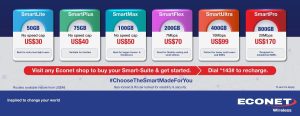
Econet’s Smart USD Bundles seem like one of the best deals in Data Bundles right now. However as we already stated, accessing them is not an easy feat for some, as most don’t’ even know how to buy them. Allow us to help with that.
First, you should note that these bundles are accessible through Econet’s *143# portal, just like other data and social media bundles. If you select Option 1: Smart USD Bundles, you can buy them.
As for purchasing these bundles, the easiest way to do this would be going to an Econet Shop, when we wrote our previous story, Econet had told us through Twitter that using an Ecocash FCA account is another way to purchase said bundles, but at the time of writing this feature seems disabled, and as such you can only purchase these bundles through USD Airtime bought at an Econet shop.
So :
Step 1: Purchase USD Airtime at your nearest available Econet shop
Step 2: Recharge this airtime like you would any regular scratch card : *121*card code# t
Step 3: Dial *143# and select the Smart USD Bundles option.
Step 4:  Select the bundle package of your choice
Step 5: Choose the Airtime purchase option.
 
As long as you have the required Airtime that should be it, the bundle will recharge without any hassles.
We’ll keep you posted if other forms of purchase (like the Ecocash FCA option) become available. Otherwise keep it locked here at TZP.

Related Stories:

About Author

LEAVE A RESPONSE

Your email address will not be published. Required fields are marked *